A million-point chart: measuring a switch from Canvas 2D to WebGL
WebGL2 is now a separate fourth option alongside the existing Canvas 2D, tuned ECharts and naive ECharts implementations. They share the six synthetic signals; Canvas and WebGL also share column aggregation, the Canvas 2D background and crosshair.
Both implementations ran smoothly in this test. With 1M historical points, both reached about 60 rAF callbacks per second. Median CPU-side full-history review time was 13.1 ms for Canvas 2D and 12.3 ms for WebGL2. That small difference does not establish a ranking of completed GPU rendering.
What changes when a chart moves away from DOM
With DOM, the browser manages individual elements, their styles and their hit targets. A canvas is itself a DOM element, but its curves have no corresponding DOM nodes. The application keeps their coordinates and handles interaction.
Canvas 2D provides drawing commands: move to a point, connect to the next point, choose a color and stroke the path. The WebGL version supplies segment endpoints to small GPU programs, drawing each thick segment as two triangles.
The shared path remains:
Raw samples → visible window → pixel-column aggregation → curvesReceiving data, storing history, clipping the window and interpreting mouse coordinates are still application work.
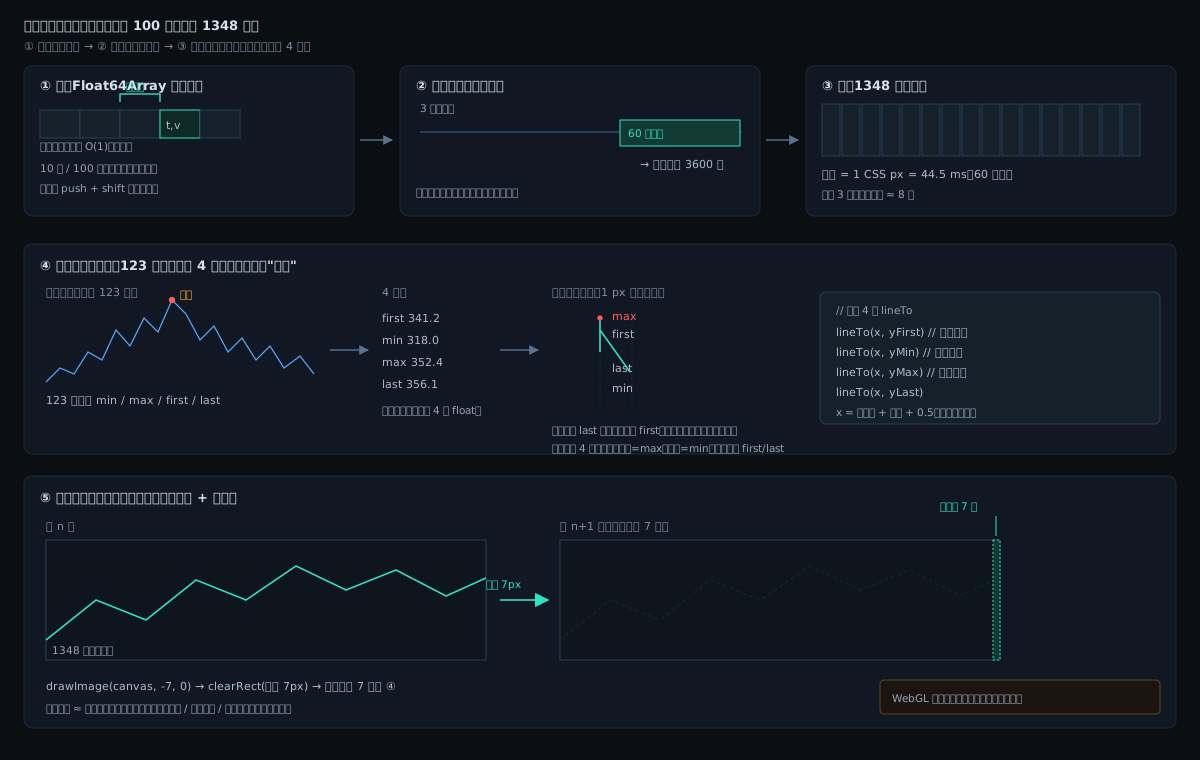
Five steps: samples land in a ring buffer → the viewport is cut out → the time axis is sliced into 1,348 pixel columns → each column collapses into four numbers and is drawn as an envelope → in steady state only the newly added column is drawn. WebGL and Canvas 2D differ only in the last step.
The GPU does not receive a million raw points
Each CSS-pixel column keeps its minimum, maximum, first and last value. The plot is about 1426 CSS pixels wide, leaving 1348 data columns after padding, separately populated for each signal.
WebGL receives segments built from these aggregates. Zooming or expanding to full history still rebuilds the grid from raw data. Ordering inside a column is compressed, so exact analysis still needs the original samples.
Stored point count, visible point count and drawn geometry count are different quantities.
Conditions and results
Chrome 155, 8 cores, DPR 2, a plot of about 1426×483 CSS pixels, with the page visible throughout. Historical values use the same random seed; timestamps are shifted to each run's current time. The viewport is 60 seconds.
Each live configuration runs for 4 seconds with a batch every 50 ms. The rate setting is 400 points/s, but rounding down across six signals produces 18 points per batch, nominally 360 points/s. Each configuration received and drew 80 batches in this run.
| Implementation | Historical points | rAF callbacks/s | Drawing-callback latency p95 |
|---|---|---|---|
| Canvas 2D reference | 100k | 60 | 14.1 ms |
| WebGL2 | 100k | 60 | 10.9 ms |
| Tuned ECharts | 100k | 60 | 14.4 ms |
| Naive ECharts | 100k | 58.6 | 36.6 ms |
| Canvas 2D reference | 1M | 60 | 11.0 ms |
| WebGL2 | 1M | 60 | 12.0 ms |
| Tuned ECharts | 1M | 60 | 25.6 ms |
rAF counts animation callbacks, rather than curve redraws. Latency ends at a drawing callback or ECharts's rendered event; it does not precisely measure physical presentation.
For full-history review, each implementation expands to three hours and runs three times in alternating order:
| Implementation | Three CPU-side times | Median |
|---|---|---|
| Canvas 2D reference | 18.4 / 13.1 / 10.8 ms | 13.1 ms |
| WebGL2 | 14.1 / 12.3 / 12.1 ms | 12.3 ms |
| Tuned ECharts | 258.7 / 231.4 / 238.1 ms | 238.1 ms |
These times include data processing and drawing calls, without waiting for all WebGL GPU work to complete. They do not establish physical presentation time or a fixed speed advantage.
The Canvas reference was temporarily imported from the earlier snapshot, with the sign of the extrema pixel-difference check corrected so extrema participate in drawing. Complete pixel equivalence has not been checked. The live page now offers four backends (layered Canvas 2D / WebGL2 trial / tuned ECharts / naive ECharts), so all four can be re-run in sequence on the same page; "layered Canvas 2D" is the Canvas reference used here.
Why WebGL did not clearly pull ahead
The implementations perform different work. When the scale is unchanged and time advances by a few columns, the Canvas reference shifts the existing bitmap and draws the new columns. The current WebGL trial rebuilds and uploads all visible segments on each update.
The million-point live run recorded 76 incremental Canvas updates and 7 full redraws, versus 82 full WebGL redraws. Hardware choice alone does not describe the workload.
Aggregation has already reduced the geometry substantially. Preparing coordinates, uploading data and submitting commands still have costs. They may affect the benefit of GPU batching, but this run did not isolate those costs.
Both implementations ran smoothly in this short test on this machine. Further optimization should follow an actual workload that needs it.
Display correctness is a separate check
Before this switch, Canvas initially drew the curves and then lost them after a few updates at DPR 2. Its bitmap copy mixed physical dimensions with CSS coordinates, repeatedly enlarging the image until the curves left the canvas.
WebGL now redraws the aggregated segments instead of shifting the old bitmap. Continuous updates, zoom, resizing, full-history review and GPU resource release pass at DPR 1, 1.25 and 2. Context-loss recovery, multiple devices and long-running stability remain untested.
Open the live demo and choose the experimental WebGL curve option. Locally, run python3 -m http.server 8765; no build is required. Regression checks are in tests/canvas-regression.js.
The raw JSON and measurement notes record the conditions and limits. This is a short, single-machine test in a fixed order; target-device validation is still required.